'%3e%3crect%20width='52'%20height='40'%20rx='10'%20fill='%23FFEA96'/%3e%3cg%20clip-path='url(%23clip1_2569_1375)'%3e%3crect%20width='59.0741'%20height='44'%20transform='translate(-3%20-4)'%20fill='%23A4ECF6'/%3e%3cg%20filter='url(%23filter0_f_2569_1375)'%3e%3cellipse%20cx='-10.3274'%20cy='7.80296'%20rx='36.4924'%20ry='39.2338'%20transform='rotate(11.6674%20-10.3274%207.80296)'%20fill='%23DDE2FF'/%3e%3cellipse%20cx='-10.3274'%20cy='7.80296'%20rx='36.4924'%20ry='39.2338'%20transform='rotate(11.6674%20-10.3274%207.80296)'%20stroke='%238FA6EB'%20stroke-width='21.4144'/%3e%3c/g%3e%3c/g%3e%3cpath%20d='M15.5%2029.3333L17.0167%2024.7833C14.3053%2020.7735%2015.353%2015.5993%2019.4667%2012.6803C23.5803%209.7625%2029.4883%2010.0017%2033.2858%2013.2403C37.0833%2016.4802%2037.5967%2021.7173%2034.4863%2025.4915C31.376%2029.2657%2025.6022%2030.409%2020.9833%2028.1667L15.5%2029.3333Z'%20stroke='white'%20stroke-width='1.5'%20stroke-linecap='round'%20stroke-linejoin='round'/%3e%3c/g%3e%3cdefs%3e%3cfilter%20id='filter0_f_2569_1375'%20x='-78.1925'%20y='-62.604'%20width='135.73'%20height='140.814'%20filterUnits='userSpaceOnUse'%20color-interpolation-filters='sRGB'%3e%3cfeFlood%20flood-opacity='0'%20result='BackgroundImageFix'/%3e%3cfeBlend%20mode='normal'%20in='SourceGraphic'%20in2='BackgroundImageFix'%20result='shape'/%3e%3cfeGaussianBlur%20stdDeviation='10.2764'%20result='effect1_foregroundBlur_2569_1375'/%3e%3c/filter%3e%3cclipPath%20id='clip0_2569_1375'%3e%3crect%20width='52'%20height='40'%20rx='10'%20fill='white'/%3e%3c/clipPath%3e%3cclipPath%20id='clip1_2569_1375'%3e%3crect%20width='59.0741'%20height='44'%20fill='white'%20transform='translate(-3%20-4)'/%3e%3c/clipPath%3e%3c/defs%3e%3c/svg%3e)
'%3e%3crect%20width='52'%20height='40'%20rx='10'%20fill='%23FFEA96'/%3e%3cg%20clip-path='url(%23clip1_2569_15019)'%3e%3crect%20width='84'%20height='42'%20transform='translate(-2%20-1)'%20fill='%2379BB84'/%3e%3cg%20filter='url(%23filter0_f_2569_15019)'%3e%3cellipse%20cx='51.2293'%20cy='24.9396'%20rx='37.103'%20ry='27.6663'%20transform='rotate(140.546%2051.2293%2024.9396)'%20fill='%2375D0AA'/%3e%3cellipse%20cx='51.2293'%20cy='24.9396'%20rx='37.103'%20ry='27.6663'%20transform='rotate(140.546%2051.2293%2024.9396)'%20stroke='%23A5E5AB'%20stroke-width='26'/%3e%3c/g%3e%3c/g%3e%3cpath%20d='M15.5%2017.6667H36.5M23.6667%209.5V30.5M15.5%2011.8333C15.5%2011.2145%2015.7458%2010.621%2016.1834%2010.1834C16.621%209.74583%2017.2145%209.5%2017.8333%209.5H34.1667C34.7855%209.5%2035.379%209.74583%2035.8166%2010.1834C36.2542%2010.621%2036.5%2011.2145%2036.5%2011.8333V28.1667C36.5%2028.7855%2036.2542%2029.379%2035.8166%2029.8166C35.379%2030.2542%2034.7855%2030.5%2034.1667%2030.5H17.8333C17.2145%2030.5%2016.621%2030.2542%2016.1834%2029.8166C15.7458%2029.379%2015.5%2028.7855%2015.5%2028.1667V11.8333Z'%20stroke='white'%20stroke-width='1.5'%20stroke-linecap='round'%20stroke-linejoin='round'/%3e%3c/g%3e%3cdefs%3e%3cfilter%20id='filter0_f_2569_15019'%20x='-8.68196'%20y='-33.1753'%20width='119.823'%20height='116.23'%20filterUnits='userSpaceOnUse'%20color-interpolation-filters='sRGB'%3e%3cfeFlood%20flood-opacity='0'%20result='BackgroundImageFix'/%3e%3cfeBlend%20mode='normal'%20in='SourceGraphic'%20in2='BackgroundImageFix'%20result='shape'/%3e%3cfeGaussianBlur%20stdDeviation='6.65'%20result='effect1_foregroundBlur_2569_15019'/%3e%3c/filter%3e%3cclipPath%20id='clip0_2569_15019'%3e%3crect%20width='52'%20height='40'%20rx='10'%20fill='white'/%3e%3c/clipPath%3e%3cclipPath%20id='clip1_2569_15019'%3e%3crect%20width='84'%20height='42'%20fill='white'%20transform='translate(-2%20-1)'/%3e%3c/clipPath%3e%3c/defs%3e%3c/svg%3e)
'%3e%3crect%20width='52'%20height='40'%20rx='10'%20fill='%23FFEA96'/%3e%3cg%20clip-path='url(%23clip1_2569_362)'%3e%3crect%20width='80'%20height='40'%20fill='%23D79BA2'/%3e%3cg%20filter='url(%23filter0_f_2569_362)'%3e%3cellipse%20cx='88.9522'%20cy='26.2192'%20rx='52.3951'%20ry='72.8474'%20transform='rotate(36.0726%2088.9522%2026.2192)'%20fill='%23B6CDEA'/%3e%3cellipse%20cx='88.9522'%20cy='26.2192'%20rx='52.3951'%20ry='72.8474'%20transform='rotate(36.0726%2088.9522%2026.2192)'%20stroke='%23829BB8'%20stroke-width='27'/%3e%3c/g%3e%3c/g%3e%3cpath%20d='M29.5%209.5V14.1667C29.5%2014.4761%2029.6229%2014.7728%2029.8417%2014.9916C30.0605%2015.2104%2030.3572%2015.3333%2030.6666%2015.3333H35.3333M35.3333%2015.3333L29.5%209.5H24.8333C24.2145%209.5%2023.621%209.74583%2023.1834%2010.1834C22.7458%2010.621%2022.5%2011.2145%2022.5%2011.8333V23.5C22.5%2024.1188%2022.7458%2024.7123%2023.1834%2025.1499C23.621%2025.5875%2024.2145%2025.8333%2024.8333%2025.8333H33C33.6188%2025.8333%2034.2123%2025.5875%2034.6499%2025.1499C35.0875%2024.7123%2035.3333%2024.1188%2035.3333%2023.5V15.3333ZM30.6666%2025.8333V28.1667C30.6666%2028.7855%2030.4208%2029.379%2029.9832%2029.8166C29.5456%2030.2542%2028.9522%2030.5%2028.3333%2030.5H20.1666C19.5478%2030.5%2018.9543%2030.2542%2018.5167%2029.8166C18.0791%2029.379%2017.8333%2028.7855%2017.8333%2028.1667V16.5C17.8333%2015.8812%2018.0791%2015.2877%2018.5167%2014.8501C18.9543%2014.4125%2019.5478%2014.1667%2020.1666%2014.1667H22.5'%20stroke='white'%20stroke-width='1.5'%20stroke-linecap='round'%20stroke-linejoin='round'/%3e%3c/g%3e%3cdefs%3e%3cfilter%20id='filter0_f_2569_362'%20x='-15.6247'%20y='-84.562'%20width='209.154'%20height='221.562'%20filterUnits='userSpaceOnUse'%20color-interpolation-filters='sRGB'%3e%3cfeFlood%20flood-opacity='0'%20result='BackgroundImageFix'/%3e%3cfeBlend%20mode='normal'%20in='SourceGraphic'%20in2='BackgroundImageFix'%20result='shape'/%3e%3cfeGaussianBlur%20stdDeviation='15.4'%20result='effect1_foregroundBlur_2569_362'/%3e%3c/filter%3e%3cclipPath%20id='clip0_2569_362'%3e%3crect%20width='52'%20height='40'%20rx='10'%20fill='white'/%3e%3c/clipPath%3e%3cclipPath%20id='clip1_2569_362'%3e%3crect%20width='80'%20height='40'%20fill='white'/%3e%3c/clipPath%3e%3c/defs%3e%3c/svg%3e)
'%3e%3crect%20width='52'%20height='40'%20rx='10'%20fill='%23FFEA96'/%3e%3cg%20clip-path='url(%23clip1_2569_6710)'%3e%3crect%20width='80'%20height='40'%20transform='translate(-15)'%20fill='%233D8E9C'/%3e%3cg%20filter='url(%23filter0_f_2569_6710)'%3e%3cellipse%20cx='32.2505'%20cy='16.4558'%20rx='51.5307'%20ry='23.1466'%20transform='rotate(50.2591%2032.2505%2016.4558)'%20fill='%2364E7DE'/%3e%3cpath%20d='M44.5377%206.2394C53.1416%2016.5878%2058.8151%2027.267%2061.2268%2035.9325C63.8373%2045.3129%2062.0035%2049.4129%2060.6132%2050.5689C59.2229%2051.7249%2054.8566%2052.7803%2046.11%2048.501C38.0303%2044.548%2028.5662%2037.0204%2019.9623%2026.672C11.3585%2016.3236%205.68548%205.64501%203.27384%20-3.02044C0.663075%20-12.4014%202.49786%20-16.5016%203.88815%20-17.6575C5.27854%20-18.8134%209.64428%20-19.868%2018.3906%20-15.5889C26.4702%20-11.6359%2035.9338%20-4.10886%2044.5377%206.2394Z'%20stroke='%234ECDC4'%20stroke-width='14.3333'/%3e%3c/g%3e%3c/g%3e%3cpath%20d='M20.1667%2029.3333H31.8333M19%2013L26%2011.8333L33%2013M19%2013L22.5%2020C22.5%2020.9283%2022.1313%2021.8185%2021.4749%2022.4749C20.8185%2023.1313%2019.9283%2023.5%2019%2023.5C18.0717%2023.5%2017.1815%2023.1313%2016.5251%2022.4749C15.8687%2021.8185%2015.5%2020.9283%2015.5%2020L19%2013ZM33%2013L36.5%2020C36.5%2020.9283%2036.1313%2021.8185%2035.4749%2022.4749C34.8185%2023.1313%2033.9283%2023.5%2033%2023.5C32.0717%2023.5%2031.1815%2023.1313%2030.5251%2022.4749C29.8687%2021.8185%2029.5%2020.9283%2029.5%2020L33%2013ZM26%209.5V29.3333'%20stroke='white'%20stroke-width='1.5'%20stroke-linecap='round'%20stroke-linejoin='round'/%3e%3c/g%3e%3cdefs%3e%3cfilter%20id='filter0_f_2569_6710'%20x='-18.2683'%20y='-38.9196'%20width='101.038'%20height='110.751'%20filterUnits='userSpaceOnUse'%20color-interpolation-filters='sRGB'%3e%3cfeFlood%20flood-opacity='0'%20result='BackgroundImageFix'/%3e%3cfeBlend%20mode='normal'%20in='SourceGraphic'%20in2='BackgroundImageFix'%20result='shape'/%3e%3cfeGaussianBlur%20stdDeviation='6.53333'%20result='effect1_foregroundBlur_2569_6710'/%3e%3c/filter%3e%3cclipPath%20id='clip0_2569_6710'%3e%3crect%20width='52'%20height='40'%20rx='10'%20fill='white'/%3e%3c/clipPath%3e%3cclipPath%20id='clip1_2569_6710'%3e%3crect%20width='80'%20height='40'%20fill='white'%20transform='translate(-15)'/%3e%3c/clipPath%3e%3c/defs%3e%3c/svg%3e)
'%3e%3crect%20width='52'%20height='40'%20rx='10'%20fill='%23FFEA96'/%3e%3cg%20clip-path='url(%23clip1_2569_4656)'%3e%3crect%20width='100'%20height='50'%20transform='translate(-24%20-4)'%20fill='%238D8DCF'/%3e%3cg%20filter='url(%23filter0_f_2569_4656)'%3e%3cellipse%20cx='16.4735'%20cy='40.123'%20rx='70.3864'%20ry='33.942'%20transform='rotate(-179.853%2016.4735%2040.123)'%20fill='%23D6C6FF'/%3e%3cpath%20d='M16.4056%2066.4097C-2.13768%2066.3619%20-18.5399%2062.679%20-30.016%2057.1085C-42.0318%2051.276%20-46.2693%2044.7259%20-46.2571%2039.9612C-46.2446%2035.1965%20-41.9732%2028.6691%20-29.9279%2022.8987C-18.4234%2017.3873%20-2.00237%2013.7889%2016.5409%2013.8366C35.084%2013.8843%2051.4863%2017.5673%2062.9624%2023.1377C74.978%2028.9701%2079.2165%2035.5194%2079.2045%2040.2841C79.1922%2045.0488%2074.9201%2051.577%2062.8743%2057.3476C51.3697%2062.8588%2034.9487%2066.4574%2016.4056%2066.4097Z'%20stroke='%239B89EE'%20stroke-width='15.311'/%3e%3c/g%3e%3c/g%3e%3cpath%20d='M28.3333%209.5V14.1667C28.3333%2014.4761%2028.4563%2014.7728%2028.6751%2014.9916C28.8938%2015.2104%2029.1906%2015.3333%2029.5%2015.3333H34.1667M34.1667%2020V15.3333L28.3333%209.5H20.1667C19.5478%209.5%2018.9543%209.74583%2018.5168%2010.1834C18.0792%2010.621%2017.8333%2011.2145%2017.8333%2011.8333V20M17.8333%2027H19.5833C20.0475%2027%2020.4926%2026.8156%2020.8208%2026.4874C21.149%2026.1592%2021.3333%2025.7141%2021.3333%2025.25C21.3333%2024.7859%2021.149%2024.3408%2020.8208%2024.0126C20.4926%2023.6844%2020.0475%2023.5%2019.5833%2023.5H17.8333V30.5M31.8333%2027H34.1667M35.3333%2023.5H31.8333V30.5M24.8333%2023.5V30.5H26C26.6188%2030.5%2027.2123%2030.2542%2027.6499%2029.8166C28.0875%2029.379%2028.3333%2028.7855%2028.3333%2028.1667V25.8333C28.3333%2025.2145%2028.0875%2024.621%2027.6499%2024.1834C27.2123%2023.7458%2026.6188%2023.5%2026%2023.5H24.8333Z'%20stroke='white'%20stroke-width='1.5'%20stroke-linecap='round'%20stroke-linejoin='round'/%3e%3c/g%3e%3cdefs%3e%3cfilter%20id='filter0_f_2569_4656'%20x='-70.246'%20y='-10.1527'%20width='173.439'%20height='100.551'%20filterUnits='userSpaceOnUse'%20color-interpolation-filters='sRGB'%3e%3cfeFlood%20flood-opacity='0'%20result='BackgroundImageFix'/%3e%3cfeBlend%20mode='normal'%20in='SourceGraphic'%20in2='BackgroundImageFix'%20result='shape'/%3e%3cfeGaussianBlur%20stdDeviation='8.16667'%20result='effect1_foregroundBlur_2569_4656'/%3e%3c/filter%3e%3cclipPath%20id='clip0_2569_4656'%3e%3crect%20width='52'%20height='40'%20rx='10'%20fill='white'/%3e%3c/clipPath%3e%3cclipPath%20id='clip1_2569_4656'%3e%3crect%20width='100'%20height='50'%20fill='white'%20transform='translate(-24%20-4)'/%3e%3c/clipPath%3e%3c/defs%3e%3c/svg%3e)
'%3e%3crect%20width='52'%20height='40'%20rx='10'%20fill='%23FFEA96'/%3e%3cg%20clip-path='url(%23clip1_2569_4888)'%3e%3crect%20width='100'%20height='50'%20transform='translate(-24%20-4)'%20fill='%2386568A'/%3e%3cg%20filter='url(%23filter0_f_2569_4888)'%3e%3cellipse%20cx='22.6407'%20cy='24.5662'%20rx='70.3864'%20ry='17.9732'%20transform='rotate(-58.3133%2022.6407%2024.5662)'%20fill='%23F3B3F5'/%3e%3cellipse%20cx='22.6407'%20cy='24.5662'%20rx='70.3864'%20ry='17.9732'%20transform='rotate(-58.3133%2022.6407%2024.5662)'%20stroke='%23B97ACE'%20stroke-width='13'/%3e%3c/g%3e%3c/g%3e%3cpath%20d='M27.1667%209.5V17.6667H34.1667L24.8333%2030.5V22.3333H17.8333L27.1667%209.5Z'%20stroke='white'%20stroke-width='1.5'%20stroke-linecap='round'%20stroke-linejoin='round'/%3e%3c/g%3e%3cdefs%3e%3cfilter%20id='filter0_f_2569_4888'%20x='-38.5803'%20y='-57.283'%20width='122.442'%20height='163.698'%20filterUnits='userSpaceOnUse'%20color-interpolation-filters='sRGB'%3e%3cfeFlood%20flood-opacity='0'%20result='BackgroundImageFix'/%3e%3cfeBlend%20mode='normal'%20in='SourceGraphic'%20in2='BackgroundImageFix'%20result='shape'/%3e%3cfeGaussianBlur%20stdDeviation='7.35'%20result='effect1_foregroundBlur_2569_4888'/%3e%3c/filter%3e%3cclipPath%20id='clip0_2569_4888'%3e%3crect%20width='52'%20height='40'%20rx='10'%20fill='white'/%3e%3c/clipPath%3e%3cclipPath%20id='clip1_2569_4888'%3e%3crect%20width='100'%20height='50'%20fill='white'%20transform='translate(-24%20-4)'/%3e%3c/clipPath%3e%3c/defs%3e%3c/svg%3e)





Litigation Files
Your exhibits, submissions
and an up-to-date list
Prepare the case file, cite exhibits in Word and revisit the list as your submissions evolve.
How it works
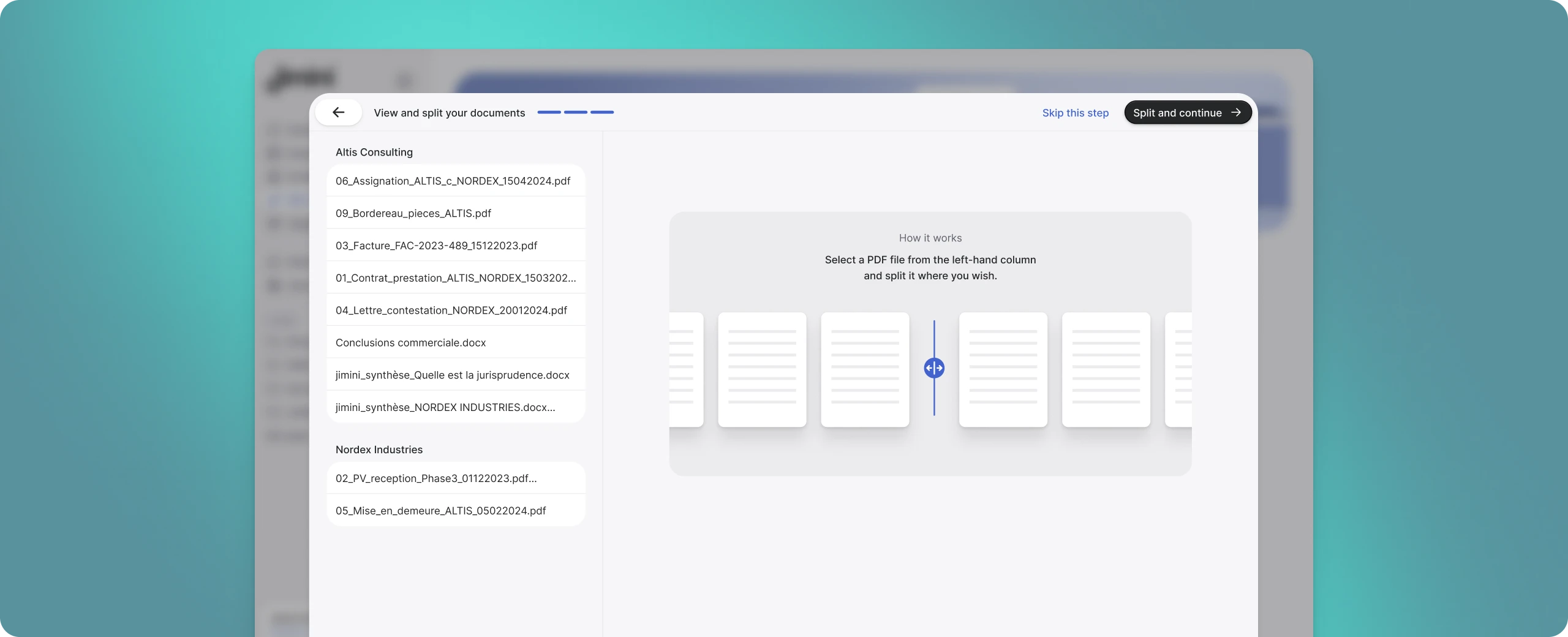
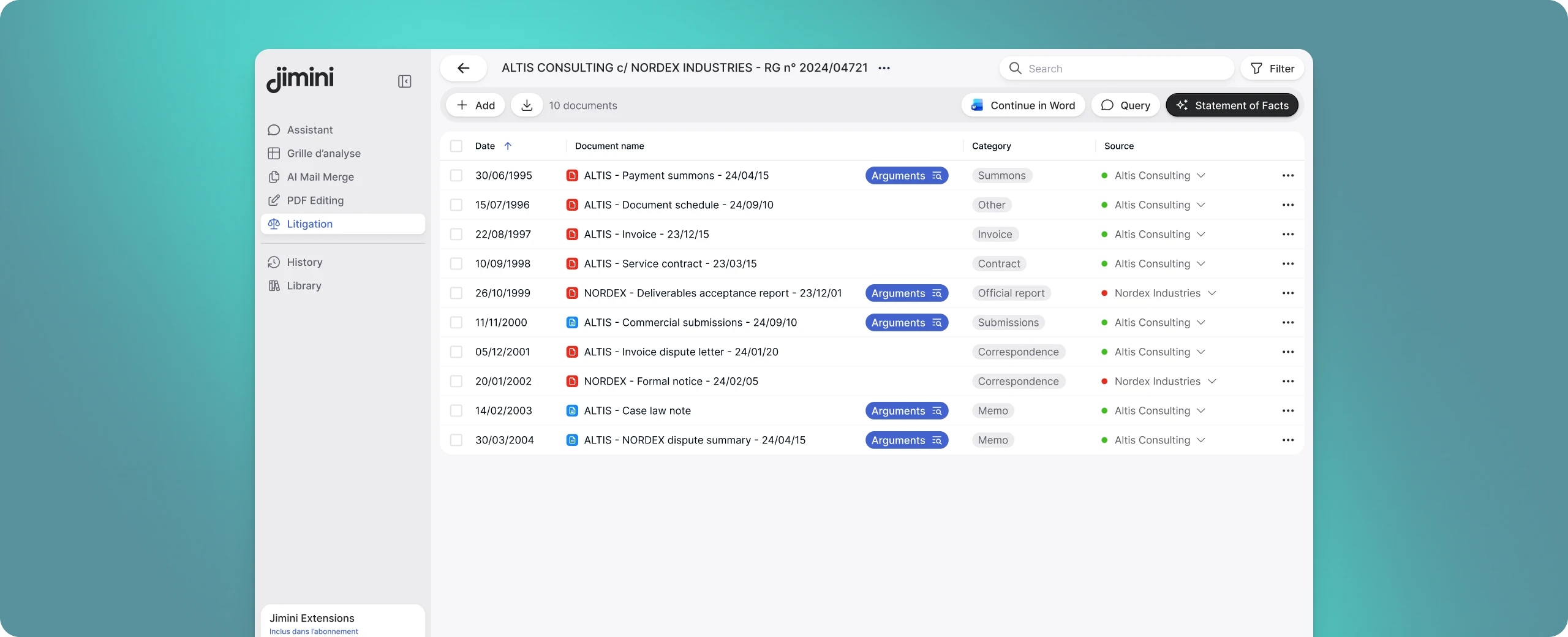
From raw files
to exhibits ready to cite
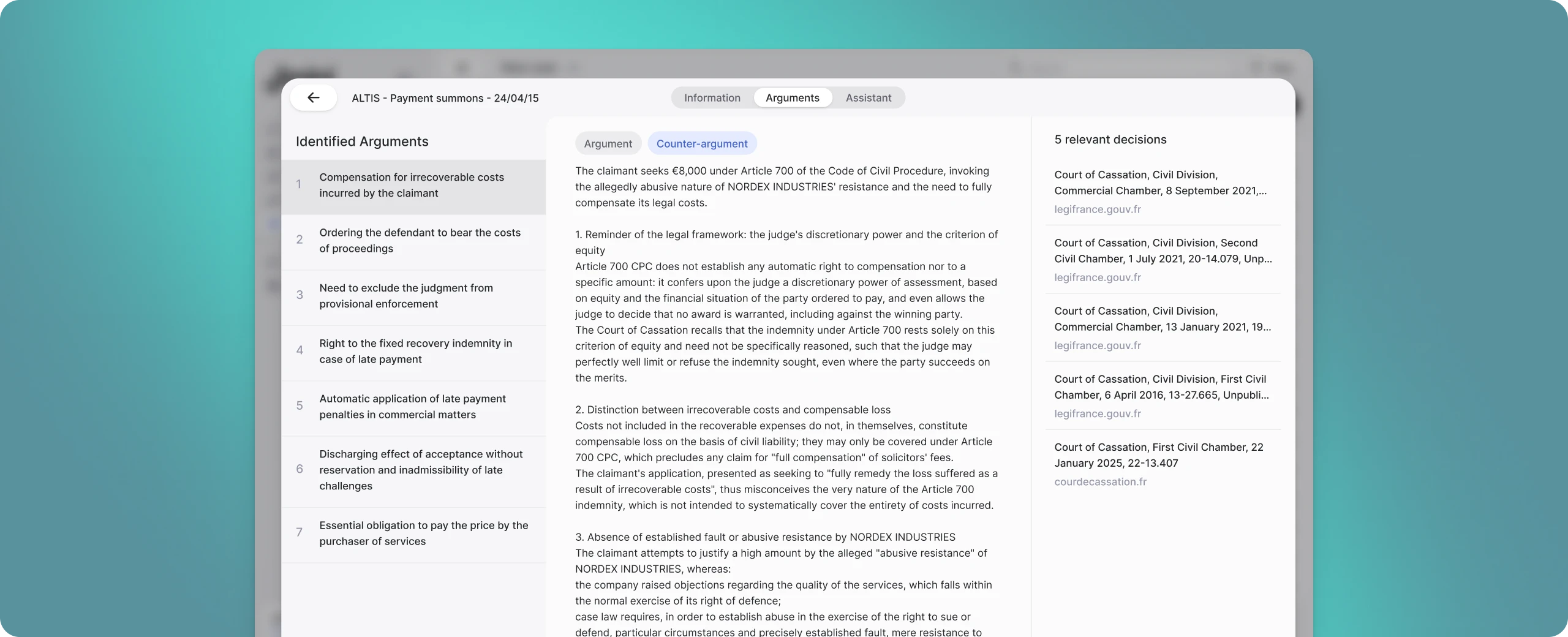
Split and rename exhibits, find the relevant facts and prepare citations in Word.

Steps
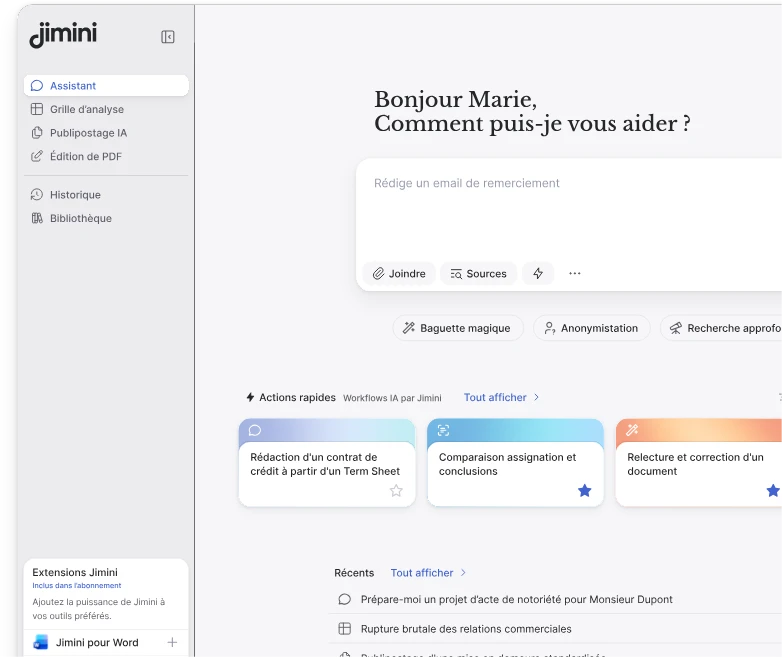
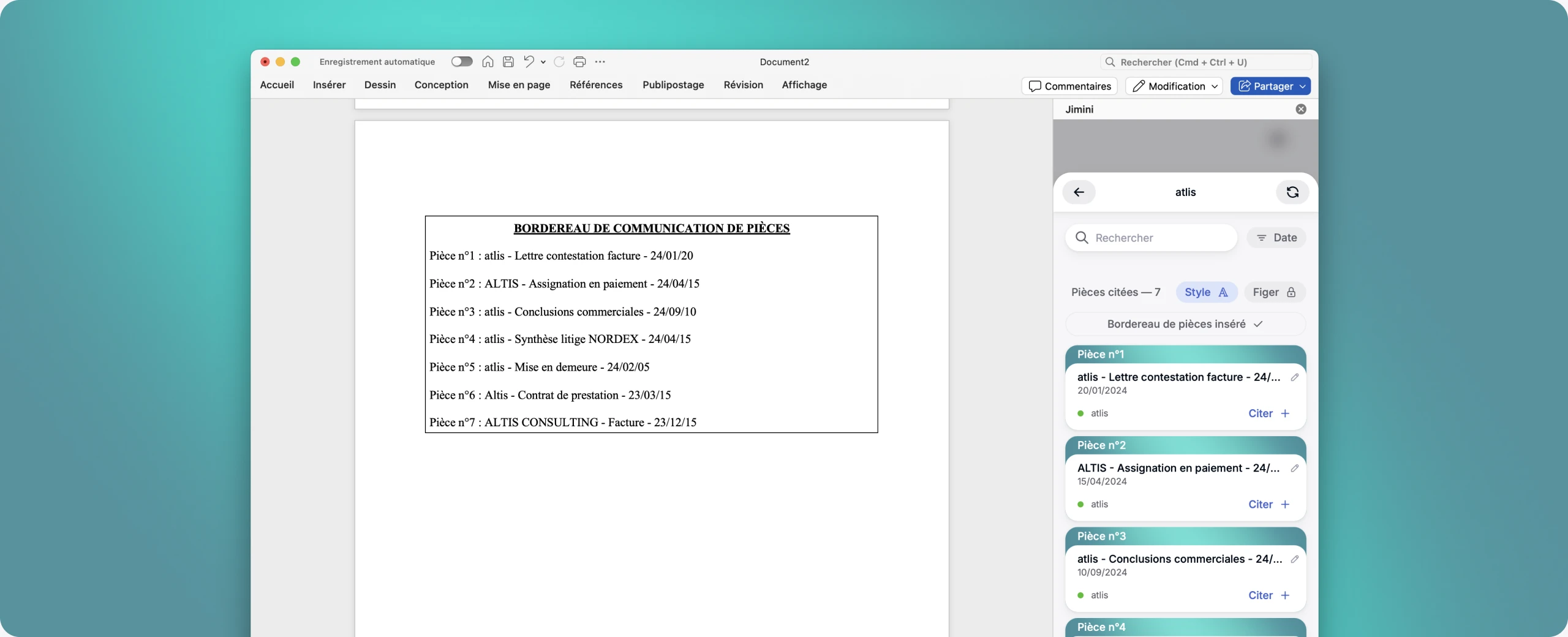
Jimini for Word
Continue directly in Word
Cite your exhibits
Cite your exhibits easily, once or several times, directly in Word. Numbering adjusts automatically.
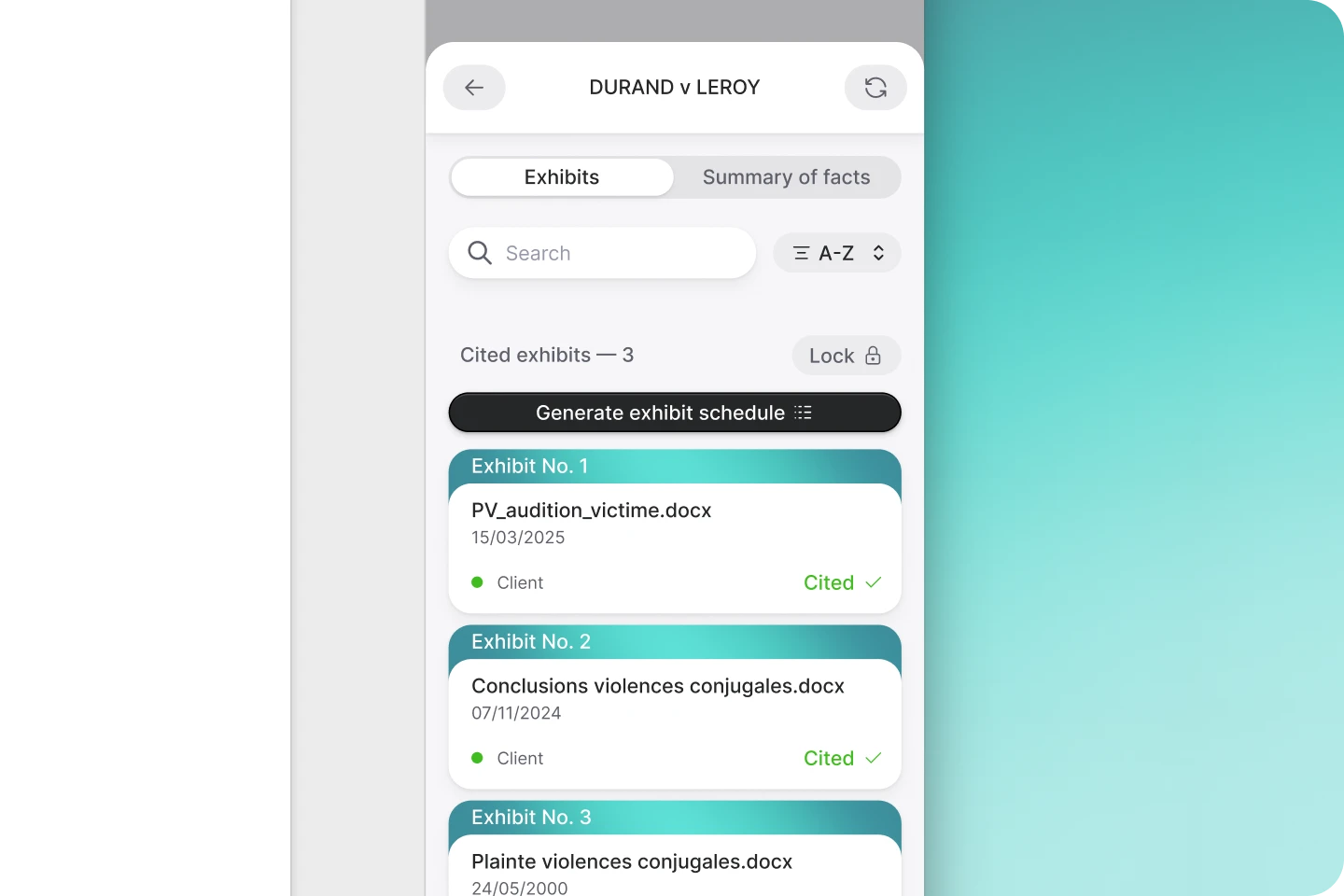
Generate the exhibit list
Create the list from your citations. It updates when you add, remove or move an exhibit in your submissions.
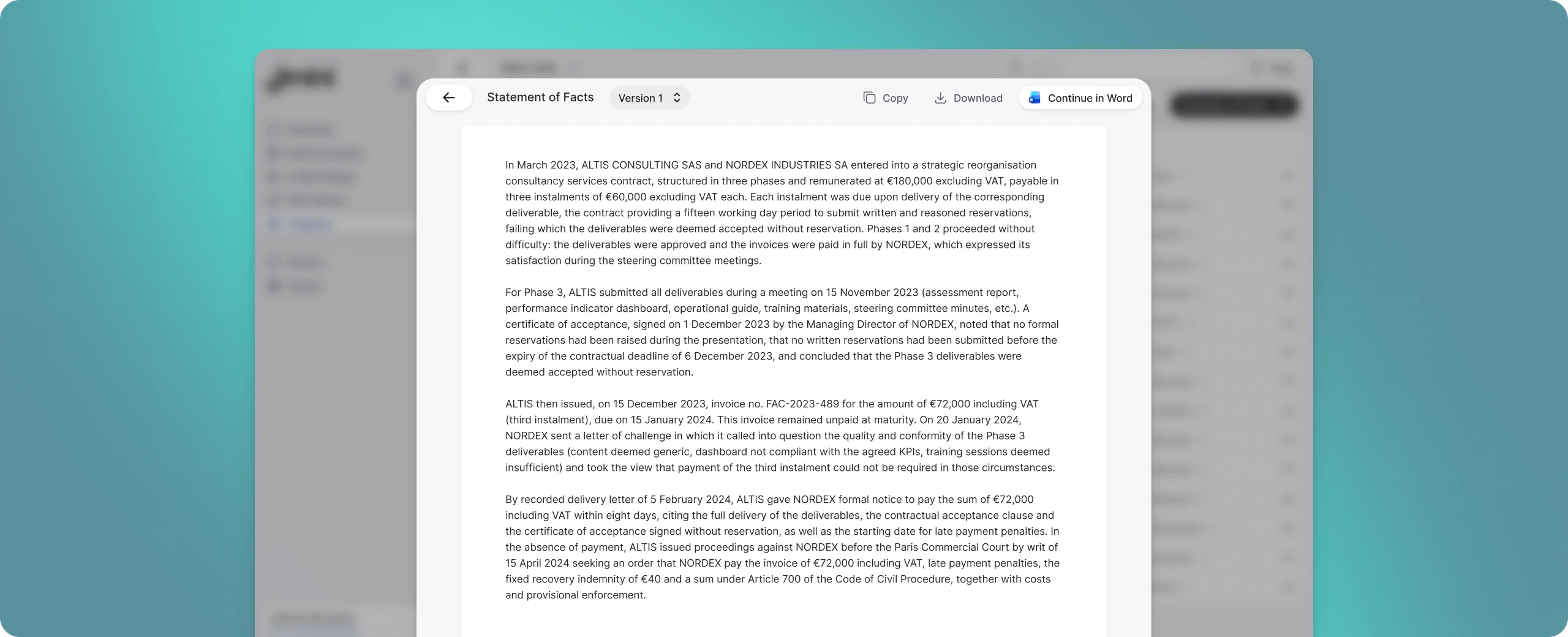
Insert the statement of facts
Jimini prepares a statement of facts based on the case exhibits. Review it before inserting it into your submissions.
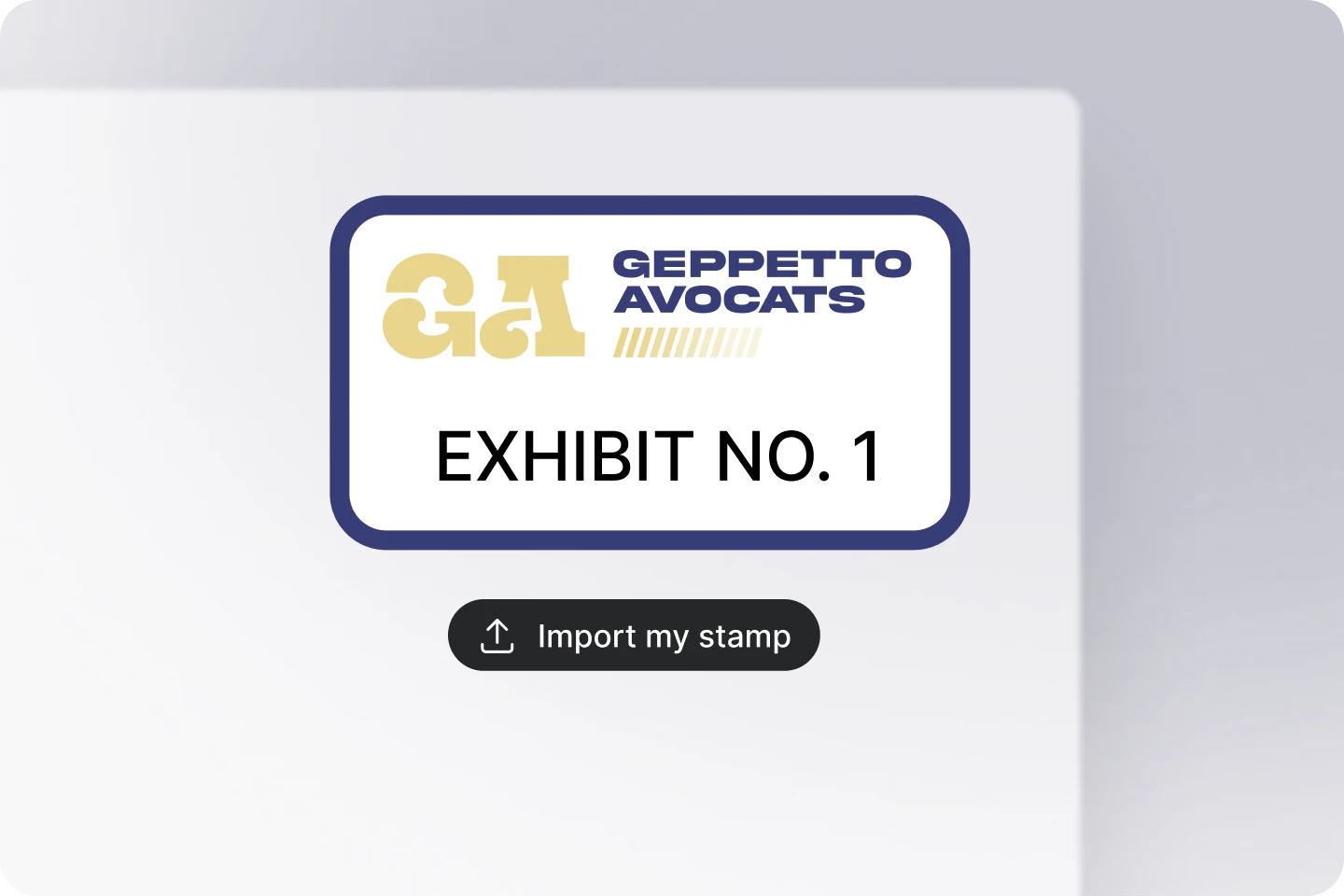
Exhibit stamping
No more generic
electronic stamps
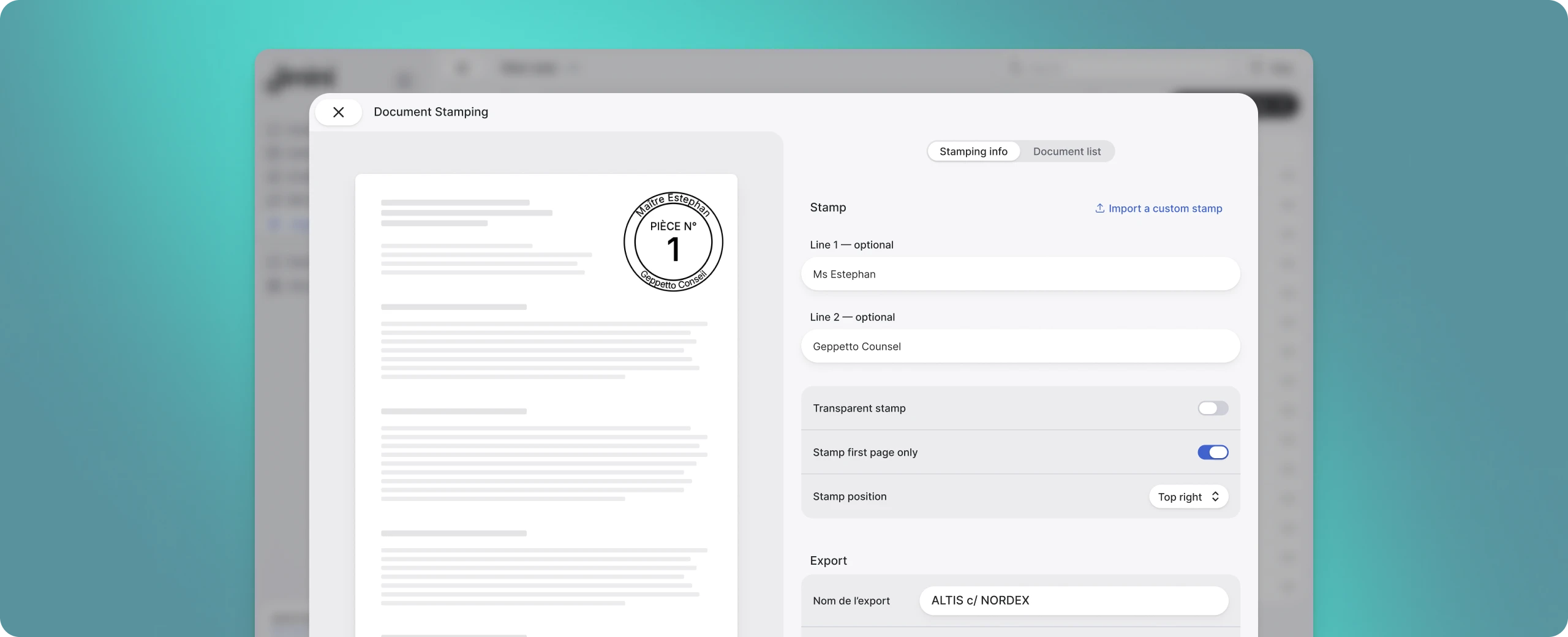
Use your firm's official stamp
Import your firm stamp; Jimini makes it compatible with the numbering system.
Store several stamps at once
If you work across several teams, store multiple stamps and use the right one for each matter.
Presentation options
Multiple presentation options: placement, transparency...
Collaboration
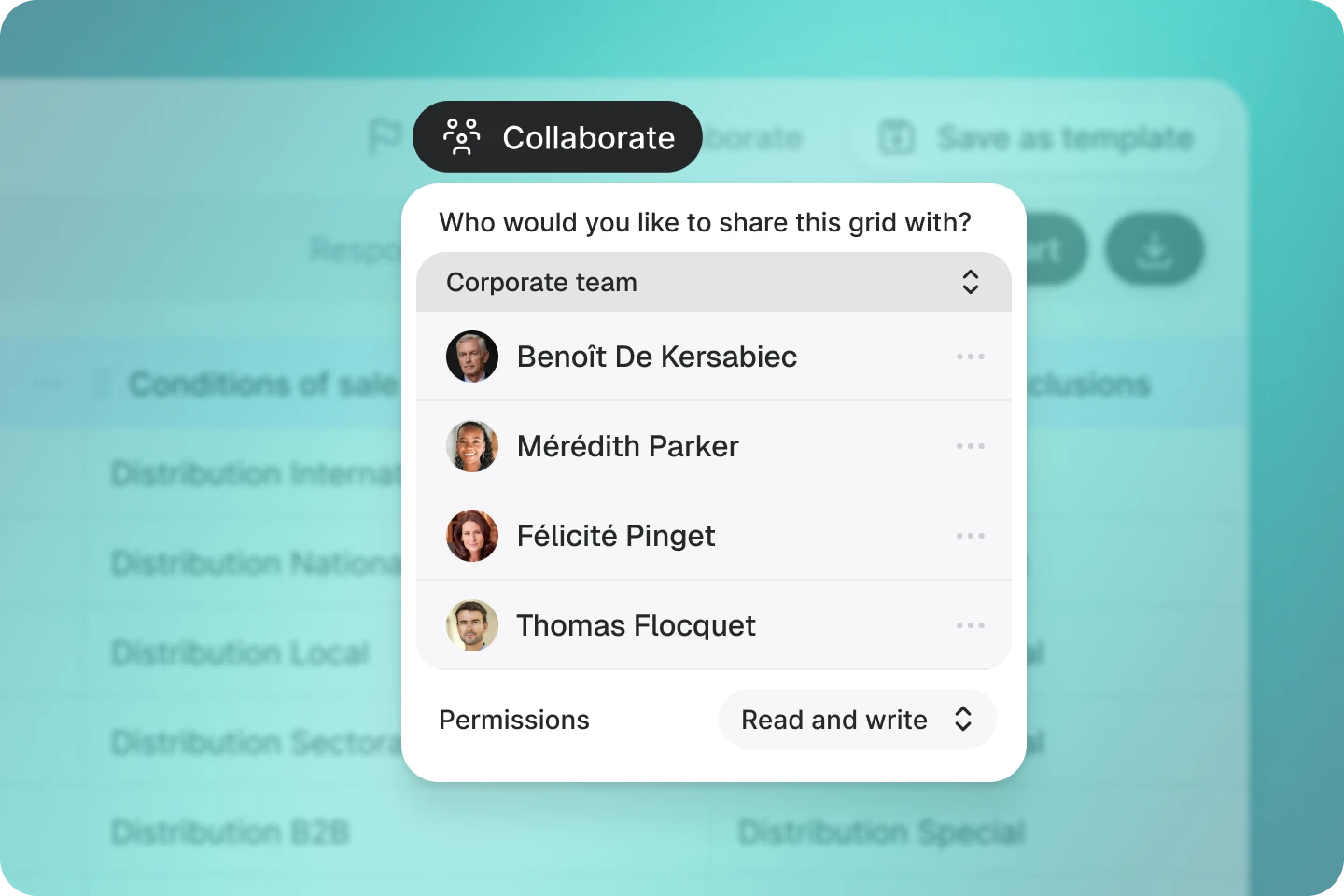
Collaborate on your
litigation files
Collaborate on your matters in real time
Drag and drop your files or connect them from your database.
Create and share your grid templates
Drag and drop your files or connect them from your database.
Import your documents
Drag and drop your files or connect them from your database.
Frequently asked questions
Everything you need to know before trying it
Can I rename my exhibits using a custom format?
Yes. Customise the renaming format (type, parties, date, court). The names are automatically carried over into the exhibit list and your Word citations.
Can I add exhibits to my case later, once it has been created?
Yes. Open your case and click Add. You can also delete, rename and download your exhibits.
What does the "Ask" button on my exhibits do?
It starts a conversation with the Jimini agent about one or several exhibits, to analyse them or ask questions.
Can I get a summary of the facts of my case?
Yes. Generate a statement of facts from the selected exhibits and compare several versions.
How do I cite my exhibits in my court submissions, with automatic numbering?
In Jimini for Word, citations, numbering and the exhibit list all update automatically.
Can I lock the order of my exhibits?
Yes. In locked mode the order stays fixed. In unlocked mode it follows the order of the citations in your document.