'%3e%3crect%20width='52'%20height='40'%20rx='10'%20fill='%23FFEA96'/%3e%3cg%20clip-path='url(%23clip1_2569_1375)'%3e%3crect%20width='59.0741'%20height='44'%20transform='translate(-3%20-4)'%20fill='%23A4ECF6'/%3e%3cg%20filter='url(%23filter0_f_2569_1375)'%3e%3cellipse%20cx='-10.3274'%20cy='7.80296'%20rx='36.4924'%20ry='39.2338'%20transform='rotate(11.6674%20-10.3274%207.80296)'%20fill='%23DDE2FF'/%3e%3cellipse%20cx='-10.3274'%20cy='7.80296'%20rx='36.4924'%20ry='39.2338'%20transform='rotate(11.6674%20-10.3274%207.80296)'%20stroke='%238FA6EB'%20stroke-width='21.4144'/%3e%3c/g%3e%3c/g%3e%3cpath%20d='M15.5%2029.3333L17.0167%2024.7833C14.3053%2020.7735%2015.353%2015.5993%2019.4667%2012.6803C23.5803%209.7625%2029.4883%2010.0017%2033.2858%2013.2403C37.0833%2016.4802%2037.5967%2021.7173%2034.4863%2025.4915C31.376%2029.2657%2025.6022%2030.409%2020.9833%2028.1667L15.5%2029.3333Z'%20stroke='white'%20stroke-width='1.5'%20stroke-linecap='round'%20stroke-linejoin='round'/%3e%3c/g%3e%3cdefs%3e%3cfilter%20id='filter0_f_2569_1375'%20x='-78.1925'%20y='-62.604'%20width='135.73'%20height='140.814'%20filterUnits='userSpaceOnUse'%20color-interpolation-filters='sRGB'%3e%3cfeFlood%20flood-opacity='0'%20result='BackgroundImageFix'/%3e%3cfeBlend%20mode='normal'%20in='SourceGraphic'%20in2='BackgroundImageFix'%20result='shape'/%3e%3cfeGaussianBlur%20stdDeviation='10.2764'%20result='effect1_foregroundBlur_2569_1375'/%3e%3c/filter%3e%3cclipPath%20id='clip0_2569_1375'%3e%3crect%20width='52'%20height='40'%20rx='10'%20fill='white'/%3e%3c/clipPath%3e%3cclipPath%20id='clip1_2569_1375'%3e%3crect%20width='59.0741'%20height='44'%20fill='white'%20transform='translate(-3%20-4)'/%3e%3c/clipPath%3e%3c/defs%3e%3c/svg%3e)
'%3e%3crect%20width='52'%20height='40'%20rx='10'%20fill='%23FFEA96'/%3e%3cg%20clip-path='url(%23clip1_2569_15019)'%3e%3crect%20width='84'%20height='42'%20transform='translate(-2%20-1)'%20fill='%2379BB84'/%3e%3cg%20filter='url(%23filter0_f_2569_15019)'%3e%3cellipse%20cx='51.2293'%20cy='24.9396'%20rx='37.103'%20ry='27.6663'%20transform='rotate(140.546%2051.2293%2024.9396)'%20fill='%2375D0AA'/%3e%3cellipse%20cx='51.2293'%20cy='24.9396'%20rx='37.103'%20ry='27.6663'%20transform='rotate(140.546%2051.2293%2024.9396)'%20stroke='%23A5E5AB'%20stroke-width='26'/%3e%3c/g%3e%3c/g%3e%3cpath%20d='M15.5%2017.6667H36.5M23.6667%209.5V30.5M15.5%2011.8333C15.5%2011.2145%2015.7458%2010.621%2016.1834%2010.1834C16.621%209.74583%2017.2145%209.5%2017.8333%209.5H34.1667C34.7855%209.5%2035.379%209.74583%2035.8166%2010.1834C36.2542%2010.621%2036.5%2011.2145%2036.5%2011.8333V28.1667C36.5%2028.7855%2036.2542%2029.379%2035.8166%2029.8166C35.379%2030.2542%2034.7855%2030.5%2034.1667%2030.5H17.8333C17.2145%2030.5%2016.621%2030.2542%2016.1834%2029.8166C15.7458%2029.379%2015.5%2028.7855%2015.5%2028.1667V11.8333Z'%20stroke='white'%20stroke-width='1.5'%20stroke-linecap='round'%20stroke-linejoin='round'/%3e%3c/g%3e%3cdefs%3e%3cfilter%20id='filter0_f_2569_15019'%20x='-8.68196'%20y='-33.1753'%20width='119.823'%20height='116.23'%20filterUnits='userSpaceOnUse'%20color-interpolation-filters='sRGB'%3e%3cfeFlood%20flood-opacity='0'%20result='BackgroundImageFix'/%3e%3cfeBlend%20mode='normal'%20in='SourceGraphic'%20in2='BackgroundImageFix'%20result='shape'/%3e%3cfeGaussianBlur%20stdDeviation='6.65'%20result='effect1_foregroundBlur_2569_15019'/%3e%3c/filter%3e%3cclipPath%20id='clip0_2569_15019'%3e%3crect%20width='52'%20height='40'%20rx='10'%20fill='white'/%3e%3c/clipPath%3e%3cclipPath%20id='clip1_2569_15019'%3e%3crect%20width='84'%20height='42'%20fill='white'%20transform='translate(-2%20-1)'/%3e%3c/clipPath%3e%3c/defs%3e%3c/svg%3e)
'%3e%3crect%20width='52'%20height='40'%20rx='10'%20fill='%23FFEA96'/%3e%3cg%20clip-path='url(%23clip1_2569_362)'%3e%3crect%20width='80'%20height='40'%20fill='%23D79BA2'/%3e%3cg%20filter='url(%23filter0_f_2569_362)'%3e%3cellipse%20cx='88.9522'%20cy='26.2192'%20rx='52.3951'%20ry='72.8474'%20transform='rotate(36.0726%2088.9522%2026.2192)'%20fill='%23B6CDEA'/%3e%3cellipse%20cx='88.9522'%20cy='26.2192'%20rx='52.3951'%20ry='72.8474'%20transform='rotate(36.0726%2088.9522%2026.2192)'%20stroke='%23829BB8'%20stroke-width='27'/%3e%3c/g%3e%3c/g%3e%3cpath%20d='M29.5%209.5V14.1667C29.5%2014.4761%2029.6229%2014.7728%2029.8417%2014.9916C30.0605%2015.2104%2030.3572%2015.3333%2030.6666%2015.3333H35.3333M35.3333%2015.3333L29.5%209.5H24.8333C24.2145%209.5%2023.621%209.74583%2023.1834%2010.1834C22.7458%2010.621%2022.5%2011.2145%2022.5%2011.8333V23.5C22.5%2024.1188%2022.7458%2024.7123%2023.1834%2025.1499C23.621%2025.5875%2024.2145%2025.8333%2024.8333%2025.8333H33C33.6188%2025.8333%2034.2123%2025.5875%2034.6499%2025.1499C35.0875%2024.7123%2035.3333%2024.1188%2035.3333%2023.5V15.3333ZM30.6666%2025.8333V28.1667C30.6666%2028.7855%2030.4208%2029.379%2029.9832%2029.8166C29.5456%2030.2542%2028.9522%2030.5%2028.3333%2030.5H20.1666C19.5478%2030.5%2018.9543%2030.2542%2018.5167%2029.8166C18.0791%2029.379%2017.8333%2028.7855%2017.8333%2028.1667V16.5C17.8333%2015.8812%2018.0791%2015.2877%2018.5167%2014.8501C18.9543%2014.4125%2019.5478%2014.1667%2020.1666%2014.1667H22.5'%20stroke='white'%20stroke-width='1.5'%20stroke-linecap='round'%20stroke-linejoin='round'/%3e%3c/g%3e%3cdefs%3e%3cfilter%20id='filter0_f_2569_362'%20x='-15.6247'%20y='-84.562'%20width='209.154'%20height='221.562'%20filterUnits='userSpaceOnUse'%20color-interpolation-filters='sRGB'%3e%3cfeFlood%20flood-opacity='0'%20result='BackgroundImageFix'/%3e%3cfeBlend%20mode='normal'%20in='SourceGraphic'%20in2='BackgroundImageFix'%20result='shape'/%3e%3cfeGaussianBlur%20stdDeviation='15.4'%20result='effect1_foregroundBlur_2569_362'/%3e%3c/filter%3e%3cclipPath%20id='clip0_2569_362'%3e%3crect%20width='52'%20height='40'%20rx='10'%20fill='white'/%3e%3c/clipPath%3e%3cclipPath%20id='clip1_2569_362'%3e%3crect%20width='80'%20height='40'%20fill='white'/%3e%3c/clipPath%3e%3c/defs%3e%3c/svg%3e)
'%3e%3crect%20width='52'%20height='40'%20rx='10'%20fill='%23FFEA96'/%3e%3cg%20clip-path='url(%23clip1_2569_6710)'%3e%3crect%20width='80'%20height='40'%20transform='translate(-15)'%20fill='%233D8E9C'/%3e%3cg%20filter='url(%23filter0_f_2569_6710)'%3e%3cellipse%20cx='32.2505'%20cy='16.4558'%20rx='51.5307'%20ry='23.1466'%20transform='rotate(50.2591%2032.2505%2016.4558)'%20fill='%2364E7DE'/%3e%3cpath%20d='M44.5377%206.2394C53.1416%2016.5878%2058.8151%2027.267%2061.2268%2035.9325C63.8373%2045.3129%2062.0035%2049.4129%2060.6132%2050.5689C59.2229%2051.7249%2054.8566%2052.7803%2046.11%2048.501C38.0303%2044.548%2028.5662%2037.0204%2019.9623%2026.672C11.3585%2016.3236%205.68548%205.64501%203.27384%20-3.02044C0.663075%20-12.4014%202.49786%20-16.5016%203.88815%20-17.6575C5.27854%20-18.8134%209.64428%20-19.868%2018.3906%20-15.5889C26.4702%20-11.6359%2035.9338%20-4.10886%2044.5377%206.2394Z'%20stroke='%234ECDC4'%20stroke-width='14.3333'/%3e%3c/g%3e%3c/g%3e%3cpath%20d='M20.1667%2029.3333H31.8333M19%2013L26%2011.8333L33%2013M19%2013L22.5%2020C22.5%2020.9283%2022.1313%2021.8185%2021.4749%2022.4749C20.8185%2023.1313%2019.9283%2023.5%2019%2023.5C18.0717%2023.5%2017.1815%2023.1313%2016.5251%2022.4749C15.8687%2021.8185%2015.5%2020.9283%2015.5%2020L19%2013ZM33%2013L36.5%2020C36.5%2020.9283%2036.1313%2021.8185%2035.4749%2022.4749C34.8185%2023.1313%2033.9283%2023.5%2033%2023.5C32.0717%2023.5%2031.1815%2023.1313%2030.5251%2022.4749C29.8687%2021.8185%2029.5%2020.9283%2029.5%2020L33%2013ZM26%209.5V29.3333'%20stroke='white'%20stroke-width='1.5'%20stroke-linecap='round'%20stroke-linejoin='round'/%3e%3c/g%3e%3cdefs%3e%3cfilter%20id='filter0_f_2569_6710'%20x='-18.2683'%20y='-38.9196'%20width='101.038'%20height='110.751'%20filterUnits='userSpaceOnUse'%20color-interpolation-filters='sRGB'%3e%3cfeFlood%20flood-opacity='0'%20result='BackgroundImageFix'/%3e%3cfeBlend%20mode='normal'%20in='SourceGraphic'%20in2='BackgroundImageFix'%20result='shape'/%3e%3cfeGaussianBlur%20stdDeviation='6.53333'%20result='effect1_foregroundBlur_2569_6710'/%3e%3c/filter%3e%3cclipPath%20id='clip0_2569_6710'%3e%3crect%20width='52'%20height='40'%20rx='10'%20fill='white'/%3e%3c/clipPath%3e%3cclipPath%20id='clip1_2569_6710'%3e%3crect%20width='80'%20height='40'%20fill='white'%20transform='translate(-15)'/%3e%3c/clipPath%3e%3c/defs%3e%3c/svg%3e)
'%3e%3crect%20width='52'%20height='40'%20rx='10'%20fill='%23FFEA96'/%3e%3cg%20clip-path='url(%23clip1_2569_4656)'%3e%3crect%20width='100'%20height='50'%20transform='translate(-24%20-4)'%20fill='%238D8DCF'/%3e%3cg%20filter='url(%23filter0_f_2569_4656)'%3e%3cellipse%20cx='16.4735'%20cy='40.123'%20rx='70.3864'%20ry='33.942'%20transform='rotate(-179.853%2016.4735%2040.123)'%20fill='%23D6C6FF'/%3e%3cpath%20d='M16.4056%2066.4097C-2.13768%2066.3619%20-18.5399%2062.679%20-30.016%2057.1085C-42.0318%2051.276%20-46.2693%2044.7259%20-46.2571%2039.9612C-46.2446%2035.1965%20-41.9732%2028.6691%20-29.9279%2022.8987C-18.4234%2017.3873%20-2.00237%2013.7889%2016.5409%2013.8366C35.084%2013.8843%2051.4863%2017.5673%2062.9624%2023.1377C74.978%2028.9701%2079.2165%2035.5194%2079.2045%2040.2841C79.1922%2045.0488%2074.9201%2051.577%2062.8743%2057.3476C51.3697%2062.8588%2034.9487%2066.4574%2016.4056%2066.4097Z'%20stroke='%239B89EE'%20stroke-width='15.311'/%3e%3c/g%3e%3c/g%3e%3cpath%20d='M28.3333%209.5V14.1667C28.3333%2014.4761%2028.4563%2014.7728%2028.6751%2014.9916C28.8938%2015.2104%2029.1906%2015.3333%2029.5%2015.3333H34.1667M34.1667%2020V15.3333L28.3333%209.5H20.1667C19.5478%209.5%2018.9543%209.74583%2018.5168%2010.1834C18.0792%2010.621%2017.8333%2011.2145%2017.8333%2011.8333V20M17.8333%2027H19.5833C20.0475%2027%2020.4926%2026.8156%2020.8208%2026.4874C21.149%2026.1592%2021.3333%2025.7141%2021.3333%2025.25C21.3333%2024.7859%2021.149%2024.3408%2020.8208%2024.0126C20.4926%2023.6844%2020.0475%2023.5%2019.5833%2023.5H17.8333V30.5M31.8333%2027H34.1667M35.3333%2023.5H31.8333V30.5M24.8333%2023.5V30.5H26C26.6188%2030.5%2027.2123%2030.2542%2027.6499%2029.8166C28.0875%2029.379%2028.3333%2028.7855%2028.3333%2028.1667V25.8333C28.3333%2025.2145%2028.0875%2024.621%2027.6499%2024.1834C27.2123%2023.7458%2026.6188%2023.5%2026%2023.5H24.8333Z'%20stroke='white'%20stroke-width='1.5'%20stroke-linecap='round'%20stroke-linejoin='round'/%3e%3c/g%3e%3cdefs%3e%3cfilter%20id='filter0_f_2569_4656'%20x='-70.246'%20y='-10.1527'%20width='173.439'%20height='100.551'%20filterUnits='userSpaceOnUse'%20color-interpolation-filters='sRGB'%3e%3cfeFlood%20flood-opacity='0'%20result='BackgroundImageFix'/%3e%3cfeBlend%20mode='normal'%20in='SourceGraphic'%20in2='BackgroundImageFix'%20result='shape'/%3e%3cfeGaussianBlur%20stdDeviation='8.16667'%20result='effect1_foregroundBlur_2569_4656'/%3e%3c/filter%3e%3cclipPath%20id='clip0_2569_4656'%3e%3crect%20width='52'%20height='40'%20rx='10'%20fill='white'/%3e%3c/clipPath%3e%3cclipPath%20id='clip1_2569_4656'%3e%3crect%20width='100'%20height='50'%20fill='white'%20transform='translate(-24%20-4)'/%3e%3c/clipPath%3e%3c/defs%3e%3c/svg%3e)
'%3e%3crect%20width='52'%20height='40'%20rx='10'%20fill='%23FFEA96'/%3e%3cg%20clip-path='url(%23clip1_2569_4888)'%3e%3crect%20width='100'%20height='50'%20transform='translate(-24%20-4)'%20fill='%2386568A'/%3e%3cg%20filter='url(%23filter0_f_2569_4888)'%3e%3cellipse%20cx='22.6407'%20cy='24.5662'%20rx='70.3864'%20ry='17.9732'%20transform='rotate(-58.3133%2022.6407%2024.5662)'%20fill='%23F3B3F5'/%3e%3cellipse%20cx='22.6407'%20cy='24.5662'%20rx='70.3864'%20ry='17.9732'%20transform='rotate(-58.3133%2022.6407%2024.5662)'%20stroke='%23B97ACE'%20stroke-width='13'/%3e%3c/g%3e%3c/g%3e%3cpath%20d='M27.1667%209.5V17.6667H34.1667L24.8333%2030.5V22.3333H17.8333L27.1667%209.5Z'%20stroke='white'%20stroke-width='1.5'%20stroke-linecap='round'%20stroke-linejoin='round'/%3e%3c/g%3e%3cdefs%3e%3cfilter%20id='filter0_f_2569_4888'%20x='-38.5803'%20y='-57.283'%20width='122.442'%20height='163.698'%20filterUnits='userSpaceOnUse'%20color-interpolation-filters='sRGB'%3e%3cfeFlood%20flood-opacity='0'%20result='BackgroundImageFix'/%3e%3cfeBlend%20mode='normal'%20in='SourceGraphic'%20in2='BackgroundImageFix'%20result='shape'/%3e%3cfeGaussianBlur%20stdDeviation='7.35'%20result='effect1_foregroundBlur_2569_4888'/%3e%3c/filter%3e%3cclipPath%20id='clip0_2569_4888'%3e%3crect%20width='52'%20height='40'%20rx='10'%20fill='white'/%3e%3c/clipPath%3e%3cclipPath%20id='clip1_2569_4888'%3e%3crect%20width='100'%20height='50'%20fill='white'%20transform='translate(-24%20-4)'/%3e%3c/clipPath%3e%3c/defs%3e%3c/svg%3e)





Legal drafting software: 2026 comparison
Compare five legal drafting tools by their published capabilities and day-to-day integrations.
Legal writing software: a new way to produce reliable, fast and compliant documents
While 83% of legal departments expect their workload to increase in the short and medium term (CLOC, State of the Industry Report 2025), legal professionals — lawyers, in-house counsel, notaries and legal departments — are increasingly turning to legal drafting software to optimise their processes.
These tools not only make it possible to gain speed of execution, but also to make each deliverable reliable, to automate repetitive tasks, to harmonise content and form, and to guarantee regulatory compliance.
Faced with these challenges, the market is seeing the emergence of more and more specialised tools, designed to precisely meet the requirements of modern legal writing.
Which legal drafting software should you choose in 2026?
The best legal drafting software is the one that matches the work you need to perform, the sources you need to use and the confidentiality your matters require. A team drafting in Word from its own precedents will not necessarily choose the same tool as a firm primarily seeking French case law, or an international legal department automating multi-step workflows.
This comparison uses information published by the five vendors as at 19 September 2026. It is not an absolute ranking and does not replace a trial on your own documents: features, access conditions and contractual safeguards should all be checked at the point of purchase.
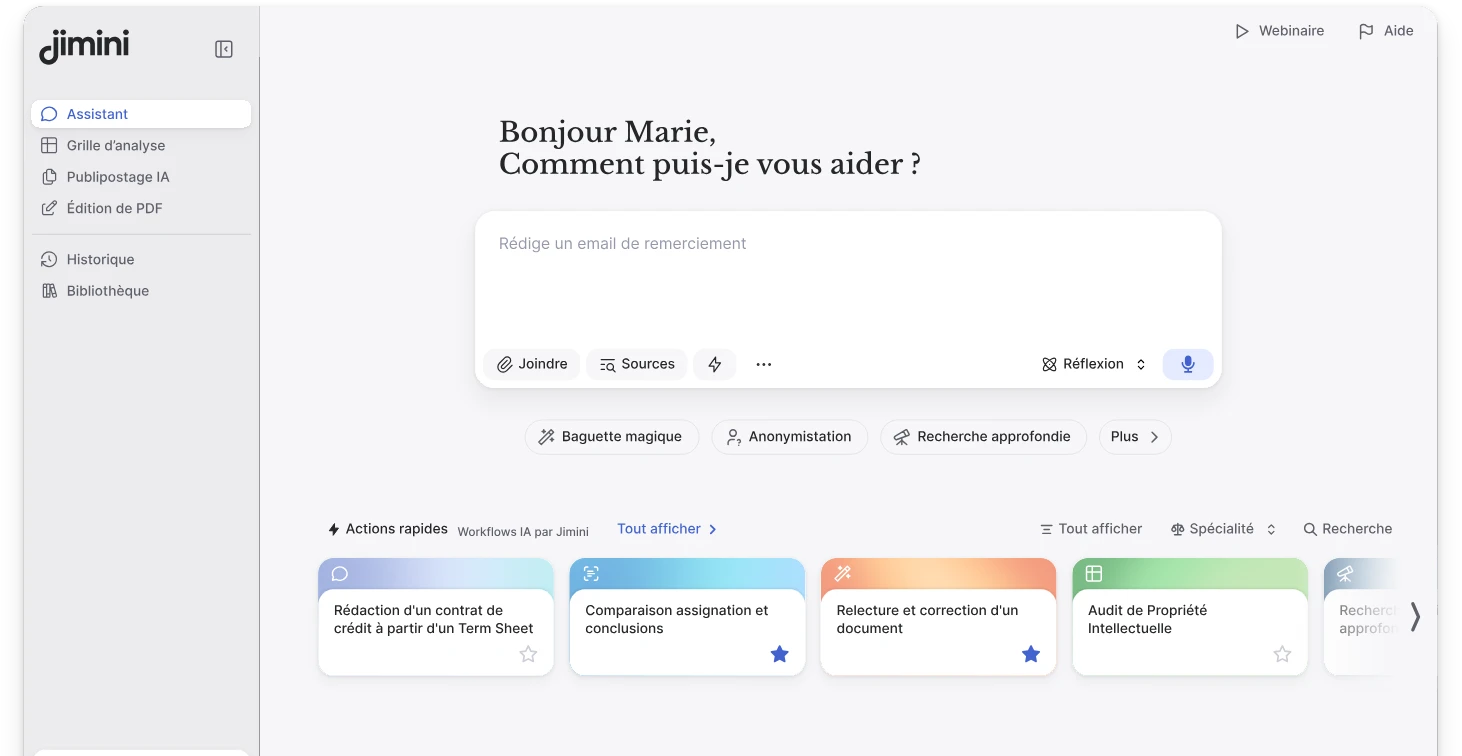
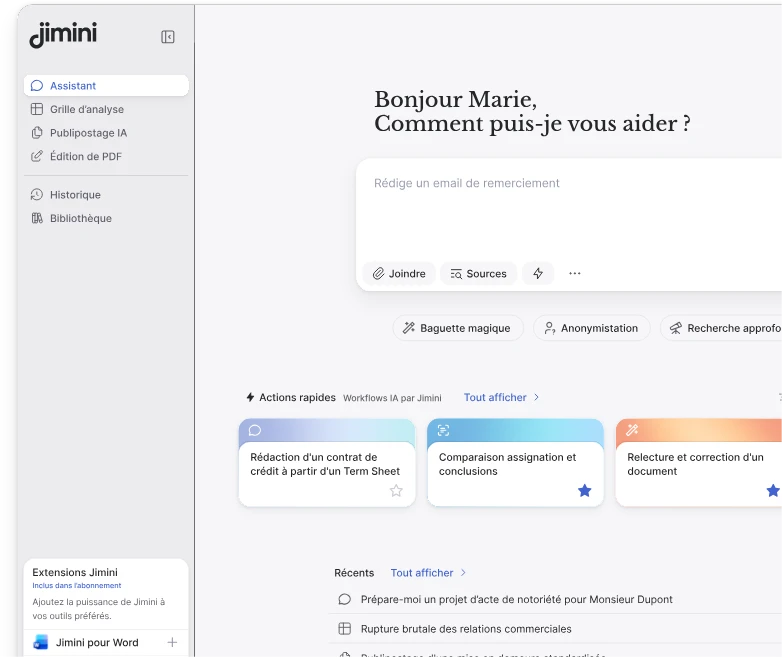
- Jimini AI is worth considering for drafting in Word from internal precedents, followed by document analysis or automated document production. Its published features include drafting and editing in Word, use of organisational documents, analysis grids and AI mail merge.
- Doctrine connects drafting to its French legal content and advisory or litigation workflows. The vendor describes AI-generated templates, reuse of precedents, a Word add-in, Flow Counsel and Flow Litigate. Its pricing page states that Flow modules supplement the main subscription.
- Lexis+ with Protégé connects research and drafting to LexisNexis content. Published capabilities include drafting legal memos, emails, arguments and clauses, sourced research, document analysis and Vault.
- Ordalie combines official legal sources, document analysis and a drafting editor, with hosting stated to be in France. Its page for lawyers describes limited free access and drafting in both French and English.
- Harvey offers law firms and in-house teams a platform combining an assistant, collaborative spaces, document vault, agents and contract intelligence. Access is through a commercial demonstration.
Which solution matches which need?
- For drafting and transforming documents directly in Word from internal precedents, compare the depth of the office integration, fidelity to your organisation’s style and final-checking features. Jimini and Doctrine both publish a Word integration.
- For combining legal research and drafting, test source coverage, citation accuracy and how easily a lawyer can verify the answer. Doctrine, Lexis+ with Protégé and Ordalie all emphasise their legal content or sources.
- For automating repetitive document production, start with a real use case: one template, one set of variables and ten expected documents. Measure configuration time, manual corrections and traceability, not generation speed alone.
- For multi-step workflows at law-firm or legal-department scale, verify jurisdictional coverage, languages, connectors and administration. Harvey publishes agents, collaborative spaces and a document vault among its capabilities.
How did we build this comparison?
The comparison above uses four criteria observable on product pages: drafting tasks, available sources, use of internal precedents and integration with working tools. Data-processing safeguards require a separate contractual assessment for each organisation.
The French National Bar Council highlights professional secrecy, data protection, competence, caution and human supervision. The French data protection authority recommends starting from a concrete need, defining permitted uses, accounting for AI limitations and choosing a robust and secure deployment. Those considerations should carry as much weight as the quality of a product demonstration.
Before selecting a tool, ask every vendor to run the same protocol: produce a first draft, adapt a clause to a negotiating position, cite the sources used, find three known inconsistencies and explain what happens to uploaded documents. Keep systematic human review in the workflow: no software removes the drafter’s professional responsibility.
What is legal writing software?
Legal writing software is a specialised solution, well beyond a simple word processor, designed to assist legal professionals in creating, automating, and securing their legal documents.
It makes it possible to draft acts and contracts based on structured models, to harmonise the content and form, to verify the conformity and consistency of the document, and to industrialise production thanks to automation and centralised model management functionalities.
The objective: to reduce the time spent on drafting, to make deliverables more reliable and to strengthen the legal security of practices.
Key features expected from legal writing software
To understand what we really expect from legal writing software, we must start from the reality of the work of lawyers: to produce quickly, well, and in a perfectly secure manner.
Behind this requirement, five major needs systematically appear, regardless of the structure, sector or volume of documentary production.
1. Real writing assistance, not just an improved proofreader
Legal professionals are not looking for a tool that writes for them, but for an assistant that can:
-
build on their models or precedents;
-
propose formulations adapted to the context;
-
help structure a complex act;
-
generate a first version based on a brief or existing elements.
The challenge is less to “produce text” than to secure the quality of the text while reducing drafting time.
This may concern, for example, the urgent production of a legal note or the adaptation of a framework contract to a new commercial context.
Situation: the urgency of Closing (M&A)
-
The challenge: It is 22:00, the day before signing. A liability guarantee clause is amended at the last minute. The risk? Create a cascading inconsistency with the definitions located 50 pages above.
-
The contribution of the software: The tool instantly scans the contract and detects that the new wording breaks the reference to the defined term “Net Debt”. It points out the error and suggests the correction.
-
The result: The risk of hardware error is neutralised in a few seconds, without re-reading the 150 pages.
Situation: the bottleneck (Legal Department)
-
The challenge: An operational person needs an urgent standard supplier contract, but the legal director, who is a chain of meetings, cannot validate the draft. The whole buying process is stuck.
-
The contribution of the software: The junior lawyer or operational officer uses a Smart frame pre-validated. The critical clauses (Responsibility, IP) are locked by the software; only commercial variables can be modified.
-
The result: The document is generated in full compliance without the intervention of the Director. The validation time is divided by three.
2. Intelligent automation to avoid repetitive tasks
In law firms and departments, a large part of the time is absorbed by:
-
updating clauses;
-
filling in variables;
-
multiple versions of the same contract;
-
maintaining a coherent internal library.
Legal writing software should make it possible to automate this mechanism. without distorting legal logic that underlies each model.
3. Verification tools that replicate the reflexes of a lawyer
Beyond simple linguistic correction, the user expects the tool to identify what the human eye could miss due to lack of time:
-
inconsistencies in definitions;
-
incorrect item returns;
-
disparate numbering;
-
mandatory information is absent;
-
misalignments between articles and annexes.
The tool should become a last safety net, without ever imposing a redaction.
4. A collaborative working environment adapted to the legal rhythm
Teams never write alone. Relevant software should therefore facilitate:
-
the back and forth between editors;
-
the integration of comments;
-
the circulation of versions;
-
and compatibility with internal tools (DMS, CLM, electronic signature).
It is no longer conceivable today for a tool to be isolated from the rest of the documentary system.
While the uses differ, the impact is strategic for all. It is no longer just about working comfort, but about economic and safety performance.
Adopting legal writing software means transforming a cost centre into a productivity centre: it is the ability to absorb an increase in volume without recruiting, to eliminate the risk of human error on high-stakes contracts, and to protect the regulatory compliance of the structure. For each player, the return on investment is measured in hours saved and risks avoided.
5. Legal writing software: flawless security, without compromise
In a profession where professional secrecy, contractual confidentiality and data sovereignty are not negotiable, legal software must provide clear guarantees:
-
European (or French) hosting;
-
strict compliance with the GDPR;
-
data encryption,
-
AI not shared between customers;
-
complete traceability of operations.
Without this, the tool is simply unusable by a legal professional.
Who is legal writing software for?
Legal writing software is not reserved for a single type of actors: it meets transversal needs across the entire legal ecosystem. While the uses differ, the objective remains the same: to produce reliable, consistent and compliant documents, while reducing the time spent on repetitive tasks.
It particularly benefits the following actors.
1. Law firms
They must quickly produce contracts, acts and projects intended for negotiation, while harmonising practices between partners and collaborators.
They find a tool to:
-
speed up the drafting of complex documents;
-
standardise their models;
-
secure the consistency and quality of projects sent to customers.
Concretely, this allows for example:
-
Generate and translate complex clauses instantly in Word (for example, by creating an aligned bilingual table) while respecting the firm’s style.
-
Extract key information from large files (documents, records or data rooms) through analysis grids, then present it as a chronology or summary table.
-
Make client deliverables reliable through automated proofreading that detects hard-to-spot errors in definitions, internal references and formatting.
2. The legal departments
They are responsible for ensuring the group’s documentary compliance, securing contractual commitments and managing a large volume of recurring documents.
They use it to:
-
harmonise internal models;
-
make validations more reliable;
-
reduce dependence on external advice.
Concretely, this allows for example:
-
To manage mass campaigns thanks to AI mailing : in one click, the lawyer generates 300 perfectly individualised amendments or declarations based on a unique model. Automation replaces hours of manual verification and eliminates the risk of lag or copy-and-paste errors on large volumes.
-
To accelerate international deployment using the legal translation combined with comparative analysis. The tool makes it possible to instantly harmonise contracts between headquarters and subsidiaries, to produce aligned multilingual versions and to detect differences between a local version and the group policy.
-
To audit the contractual stock by scanning thousands of existing contracts via the Analysis grid. The tool automatically extracts critical data (due dates, tacit renewal clauses, liability ceilings), thus transforming an inert stock of PDFs into a manageable database for decision-making.
3. Notaries, independent lawyers, VSEs/SMEs and public organisations
Their resources are limited but they must nevertheless produce compliant and secure documents.
They use these solutions to:
-
automate standard actions;
-
quickly update their models;
-
reread or make reliable documents from third parties.
Concretely, this allows for example:
-
For a notary office: Ofautomate the analysis of parts of a real estate file thanks to a preconfigured grid. The tool automatically extracts the points of vigilance from the condominium regulations or the meeting minutes to summarise them in a clear table, reducing the processing time before drafting the act by several hours.
-
For a VSE/SME: of generate independently fully compliant HR or commercial contracts (CDI, amendments, NDA). The tool guides managers via a simple questionnaire to adapt an up-to-date legal framework, allowing secure commitments of the company without incurring external consulting costs for each standard act.
Overview of the main families of legal writing software
Today, three main categories of solutions coexist, each with its advantages and limitations.
- General AI tools integrated into office automation
For example, writing assistants integrated into office suites, useful for generic tasks, but poorly adapted to the fine requirements of legal writing (reasoning, structure, references, references, compliance).
- Vertical solutions dedicated to legal
Platforms ofLegal AI Or of** SaaS legal software** that directly target law firms and departments: drafting, contract analysis, legal research, model automation.
It is in this category that Jimini AI, with a set of tools designed for the law: Assistant, Draft, Analysis Grid, Trame and, soon, Research.
- Contract Management (CLM) and Entity Management Solutions
They sometimes include drafting components, but AI is often limited to a few use cases and less focused on fine legal reasoning.
For a legal professional, the question is therefore not only “what software writes contracts?” but “what tool understands my practice and secures my responsibility?” ”
With these three families in mind, each tool should still be assessed against common criteria and a real use case.
How do I choose legal writing software?
Some key criteria to guide your choice:
-
**Functional coverage **: does the software cover the entire chain (writing, proofreading, automation, audit) or just one brick?
-
**Adapting to your practice **: does the tool work based on your own models, your documentary database, your typical positions?
-
**Security and sovereignty **: where is your data stored? Is AI shared or private? Does it respect your ethical obligations?
-
**Ergonomics & integration **: Word plug-in, EDM compatibility, electronic signature solutions, SSO, etc.
-
**Accompaniment **: training, support, co-construction of use cases, AI governance.
Jimini was designed precisely to meet these challenges, in co-construction with lawyers and in accordance with the requirements of law societies.
How does Jimini meet these needs and stand out in the market?
Built with and for legal professionals, Jimini AI is distinguished by **a hybrid approach **which combines assisted writing, document automation and sovereign legal AI.
The platform is based on several complementary modules — Draft, Frame, Magic Wand, Wand, Analysis Grid and, soon, Research — designed to cover the entire documentary life cycle: from the creation of an act to its proofreading, including automation, standardisation and compliance.
1. Assisted writing directly in Word: Jimini Draft
Jimini Draft allows:
-
creating, adapting, and rewriting clauses directly in Word;
-
writing in natural language based on a brief, an existing document or a previous one;
-
the harmonisation of style based on the client’s models and internal doctrine;
-
the generation of working versions adapted to the context, the negotiation or the end customer.
Concretely, this makes it possible for example to:
-
Write a version in a few seconds Buyer-friendly or Seller-friendly of a SPA based on the firm’s precedents;
-
restructure an assignment or procedural note to reinforce its argumentative clarity;
-
adapt a standard supplier contract to the specific requirements of a subsidiary or an operational department.
Thanks to its native integration into Word, Jimini Draft fits naturally into daily practice without requiring a change of tools.
2. Advanced automation and the creation of tailor-made acts: Trame
Thanks to the Frame brick, Jimini allows:
-
the automatic generation of acts (employment contracts, pacts, leases, agreements, etc.) from internal models;
-
the integration of existing forms or data to produce consistent and complete documents;
-
intelligent management of variables, conditional blocks and alternative versions of clauses;
-
the rapid and industrialised updating of legal models.
Concretely, this makes it possible for example to:
-
produce all the employment contracts for a recruitment campaign in a few minutes;
-
generate complete and personalised commercial leases based on a simple questionnaire;
-
Update all supplier contracts en masse following a change in policy or regulatory change.
Trame thus transforms documentary production into an industrialised and secure value chain.
3. Proofreading, verification and compliance: the magic wand
The Magic Wand allows:
-
the fine correction of the legal style;
-
harmonising the formatting, fonts, and structure of the document;
-
the automatic verification of internal inconsistencies (definitions, references, annexes, etc.);
-
legal checks during deployment (cross-references, GDPR compliance, mandatory information).
Concretely, this makes it possible for example to:
-
instantly identify unused or inconsistent definitions in a contract;
-
transform a technical contract into a clear version intended for a customer or operational officer;
-
automatically check the presence of mandatory information in an IT contract or a service contract.
All while maintaining the monitoring of changes, guaranteeing total control by the lawyer.
4. Seamless collaboration and integration with existing tools
Jimini integrates naturally into the client’s documentary ecosystem:
-
direct collaboration in Word with comments and version tracking;
-
compatibility with document management tools (OneDrive, SharePoint, internal EDM);
-
simplified validation circuits;
-
possible integration with the electronic signature.
Concretely, this makes it possible for example to:
-
working with several people on the same contract version during a supplier negotiation;
-
allow a junior collaborator to propose changes while letting the associate validate point by point;
-
integrate Jimini into a group’s document workflows (SharePoint, internal validation, integrated signature).
5. Security and sovereign AI
Jimini is distinguished by a demanding security model:
-
hosting in France;
-
strict compliance with the GDPR;
-
Private AI trained only on the client’s documentary basis;
-
no inter-client sharing;
-
total protection of professional secrecy.
Concretely, this makes it possible for example to:
-
ensure that sensitive documents (M&A, criminal, IP/IT, etc.) never leave the sovereign environment of the firm or company;
-
secure documents containing sensitive personal data within a notary office;
-
allow regulated companies (banking, health, energy) to use AI without the risk of data leaks or exploitation.
This sovereign architecture makes it a solution that perfectly meets the ethical and regulatory requirements of legal professions.
Are you looking for a legal writing software reliable, sovereign and truly adapted to your practice (law firm, legal department, public organisation or VSE/SME)? Jimini Draft allows you to write, review and automate your contracts directly in Word, without changing your work habits and relying on your own documentary database.
No formatting to redo, no tool changes: Jimini integrates natively into Word, with a private and sovereign legal AI, designed to respect professional secrecy and ethical requirements.
👉 Discover Jimini, your SaaS legal writing software : Request a demo on jimini.ai.